
MediaMonkey is a music manager and media jukebox for serious music collectors and iPod users. It catalogs your CDs, OGG, WMA, MPC, FLAC, APE, WAV and MP3 audio files. It looks up missing Album Art and track information via Freedb and the web, and includes an intelligent tag editor and an automated file and directory renamer to organize your music library.
It includes a CD ripper, CD/DVD Burner, and audio converter for saving music, and manual or automated playlist editors for creating music mixes. Its player automatically adjusts volume levels so that you don't have continually fiddle with the volume control and supports hundreds of Winamp plug-ins and visualizations; or if you prefer, it can use Winamp as the default player.It also includes portable audio device synchronization that allows you to synch tracks and play lists with devices such as the iPod and other portable audio devices.
Homepage - http://www.mediamonkey.com
Size: 6.92 MB
Download Final
MediaMonkey 3.0.6.1190 - Final
Easy CD-DA Extractor 11.9.9 Build 820 Beta

Like "Swiss Army Knife Of Digital Audio" Easy CD-DA Extractor is ALL-IN-ONE software that copies Audio CDs, converts audio files from one format to another, edits metadata of audio files and can burn Audio CD, MP3 CD & DVD, and Data CD & DVD. Easy CD-DA Extractor supports all popular audio file formats such as 3G2, 3GP, MP1, MP2, MP3, Windows Media Audio (WMA), Ogg Vorbis (OGG), MP4, M4A (AAC and Apple Lossless), AAC, aacPlus (HE-AAC, AAC+, HE-AAC+PS, eAAC+), FLAC, Musepack (MPC), WavPack (WV), WAV, AIFF, Monkey's Audio (APE), CUE and M3U.
Also, the Nero Digital (Nero AAC) is supported if you have the Nero Burning ROM installed on your computer. State-of-the-art audio encoding technology - Easy CD-DA Extractor includes the most advanced audio codec available, the aacPlus from the Coding Technologies. Additionally, Easy CD-DA Extractor also supports command line (.exe) encoders. Easy CD-DA Extractor compatible with Windows 2000, Windows XP (x86 and x64), Windows 2003, and Windows Vista (x86 and x64). Available in 30 languages.
Homepage - http://www.poikosoft.com
Size: 7.04 MB
Download Beta
MP3Producer 2.60

MP3Producer is an ideal solution for converting (grabbing) your audio CD collection to a variety of the most popular compressed audio formats such as MP3, WAV, OGG, WMA with the excellent output quality at a high ripping speed! Besides with this software you can easily convert WAV to OGG, WAV to MP3, WAV to WMA, OGG to WAV and WMA to WAV. MP3Producer has the FreeDB function with customizable settings and search options that help you to retrieve the disk information (e.g. Artist, Album, Genre and track names) from FreeDB, a music information database on the Internet.
MP3Producer supports different formats of MP3 (MPEG1 and MPEG2) and all bitrates (8-320 kbps, constant and variable), and OGG (constant, average and variable bitrates). Flexible settings allow you to define the quality of MP3, WAV and OGG files.
MP3Producer uses LAME as default MP3 encode engine. LAME is a freeware project which provides high compression speed and perfect sound quality.
Features of MP3Producer 2.60:
- converts CD tracks to MP3, OGG and WMA files
- extracts CD tracks to WAV files
- encodes WAV to MP3, OGG and WMA files
- decodes MP3, OGG and WMA files to WAV
- supports MPEG1, MPEG2; all constant, variable and average bitrates (8-320 kbps)
- supports ID3v1, ID3v2, OGG and WMA tags
- edits and creates filenames
- multi-language interface
- CDDB/FreeDB support
- built-in CD, WAV player
- play functionalities for MP3, OGG and WMA files
Size: 2.85 MB
Download
Sony ACID Pro 7.0 : Your New Creative Partner
ACID Pro is revolutionary, music production software. Create original, royalty-free music in minutes with over 1,000 included loops, and over 20 ACID Projects included on the ACID Pro content CD, or record your own tracks and enhance them with onboard tools. ACID Pro 7 includes software for professional music production and editing, including ACID Pro Effects Rack, powered by iZotope, Garritan Aria for ACID Pro Player, Submersible Music KitCore, and Native Instruments Guitar Combos.
ACID Pro 7 software is a DAW powerhouse that combines full multitrack recording and mixing, MIDI sequencing, and legendary ACID looping functionality for a seamless music-creation and post-production environment. More creative partner than production tool, ACID Pro 7 software inspires you like nothing else. With its Transparent Technology™ design, ACID Pro 7 software removes typical barriers to the creative workflow so you can effortlessly transform ideas into real results.
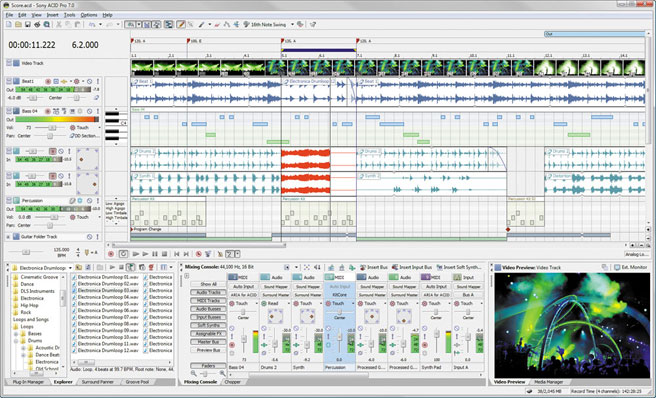
Use ACID Pro software to create your own songs, remix those tracks, produce 5.1 surround audio mixes, develop music beds, score your own videos and create music for web sites and Flash™ animations. While this revolutionary tool is intuitive and easy to use, its powerful enough for professional production. Work with a huge assortment of loops in multiple genres. ACID Pro software lets users compose using unlimited tracks of audio and MIDI, import and Beatmap complete songs. ACID Pro software saves to a variety of formats such as WAV, WMA, RM, AVI, and MP3.
Homepage - http://www.sonycreativesoftware.com/acidpro/
Size: 135 MB
n-Track Studio 6.0.1 Build 2406
Its Easy to turn a PC into multitrack audio studio system, with n-Track Studio will turns your PC into an easy to use multitrack audio recording studio. Record, edit, overdub your audio tracks, apply effects, process audio live input, mix and then burn audio CDs or create mp3 files. n-Track is the perfect tool for professional quality audio recording and editing.

n-Track Studio is an Audio & MIDI Digital Multitrack Recorder that transforms your computer into a powerful audio recording studio. You can record, playback, overdub your audio tracks exploiting the flexibility and power of today's PCs for applying effects, realtime input processing, automated aux channels sends and returns, destructive and non-destructive wave editing. The program supports 24bit-192 khz recording, 64 bit mixing, multiple channels soundcards, live input processing, CD burning, mp3 encoding and much more.
Main n-Track's features of n-Track Studio 6.0.1 Build 2406:
Records and plays back a virtually unlimited number of audio and MIDI tracks
- DirectX, VST and ReWire effects can be added to each channel/track
- Built-in effects include Reverb, Compression, Parametric & Graphic EQ, Echo, Auto-volume, Pitch Shift, Chorus, Multiband Compression, Spectrum analyzer
- Supports 16 and 24 bit single and multichannel soundcards at sampling frequencies up to 192 Khz using Asio, WaveRT, WDM, MME and DirectSound
- Is compatible with multichannel Asio, WaveRT, WDM and MME audio drivers, which means that n-Track can work with almost any soundcard available today with the lowest possible latency
- Supports VST Instruments and DirectX Instruments synth plug-ins: sample-accurate MIDI tracks can be sent to VSTi/DXi software MIDI synths, without the need of expensive hardware MIDI synths
- Supports surround mixing for creating DVD audio projects using 5.1, 6.1 and 7.1 channels surround formats
- Realtime Audio effects can be added to each channel
- Adjust the effect settings and listen to the result in real time
- Built-in effects include Reverb, Compression, Parametric and Graphic EQ, Echo, Auto-volume, Pitch Shift, Chorus, Multiband Compression, Spectrum analyzer
- Supports third party DirectX, VST 2.0 and ReWire plug-ins
- Supports 16 and 24 bit single and multichannel soundcards at sampling frequencies up to 192 Khz using Asio, WaveRT, WDM, MME and DirectSound
- Supports VST Instruments and DirectX Instruments synth plug-ins: sample-accurate MIDI tracks can be sent to VSTi/DXi software MIDI synths, without the need of expensive hardware MIDI synths
- input processing allows to process with plug-ins live signals. Record the 'dry' (unprocessed) signal while processing and reprocess the recording later - i.e. play a guitar through a distortion plug-in then change the distortion after the recording!
- Supports surround mixing for creating DVD audio projects using 5.1, 6.1 and 7.1 channels surround formats
- Each audio track includes a 20 bands parametric EQ with graphical frequency response view, a full spectrum analyzer and an automatic instrument tunerUp to 32 aux channels with fully automated sends & returns
- Multiple input and output soundcards or more than one soundcard are supported: you can record multiple tracks at a time and output to more than one stereo output. Each output channels has its own master channel effects and volume contro
- Supports technology by Propellerhead Software AB: signals from other programs (such as Reason, Ableton Live, Fruityloops and many others) can be mixed in realtime with n-Track's own channels
- Imports and exports .wav, .mp3, .wma, .mid, .ogg, .flac, .aiff, .cda, .sng, .sgw audio files
- Imports and exports EDL multitrack song files for exchanging songs with other multitrack programs
- Sync to other programs or external devices using SMPTE/MTC or MIDI Clock sync, acting either as master or slave
- Loads and saves MIDI tracks to standard MIDI files
- Videos (AVI, MPEG) can be played in sync with the song in a dedicated video playback window
- Volume, pan, aux sends & returns and effects parameters can be automated: you can "program" fade-in/outs, cross fades, boost the volume of a track when there is a solo etc.
- Once finished recording the whole song, you can mixdown all the tracks into a single wav file and to use it to record an audio CD track using a CD recorder or to distribute the song via internet using the built-in mp3 encoder
Homepage - http://ntrack.com
Size: 15.6 MB
Search


 |
 |
 |
 |
 |
 |
 |
 |
 |
 |
 |
 |
 |
 |
 |
 |
 |
 |