Spiga
Showing posts with label System Tools. Show all posts

SysExporter 1.40


SysExporter utility allows you to grab the data stored in standard list-views, tree-views, list boxes, combo boxes, text-boxes, and WebBrowser/HTML controls from almost any application running on your system, and export it to text, HTML or XML file. 

Here´s some examples for data that you can export with SysExporter:

  • The files list inside archive file (.zip, .rar, and so on) as displayed by WinZip or 7-Zip File Manager. 
  • The files list inside a folder. 
  • The event log of Windows. 
  • The list of emails and contacts in Outlook Express. 
  • The Registry values displayed in the right pane of the Registry Editor. 
  • The data displayed by SysInternals utilities (Registry Monitor, File Monitor, Process Explorer, and others.) 
  • The text inside a standard message-box of Windows. 

System Requirements: SysExporter Works perfectly on Windows NT, Windows 2000, Windows XP, Windows Server 2003, and Windows Vista. On Windows 9x and Windows ME, SysExporter can only export data from combo boxes and list boxes controls, but not from list-view and tree-view controls.

Homepage - http://www.nirsoft.net/utils/sysexp.html
Size: 37KB

Download

Total Uninstall 5.0.1


Total Uninstall - powerful installation monitor and advanced uninstaller. It is alternative uninstaller to Windows Add Remove Programs to remove programs completely. Total Uninstall is a complete uninstaller which include two working modes.

With Installed Applications module analyze installed programs and create a log that can be used to do a complete uninstall even without the help of provided Add/Remove program.

With Monitored Applications module it helps to monitor any changes made to your system during the installation of a new application. It allows you to perform a complete uninstall without having to rely on the supplied Add/Remove program which can leave files or changes behind.


Total Uninstall creates a snapshot of your system prior to installing a new application. It then takes an additional snapshot after the installation has completed. It then compares the two snapshots and displays all changes in a graphical tree view, marking all registry values and/or files that have been added, changed or deleted. Total Uninstall saves these changes and if you decide to uninstall the application, it will reverse the changes to the previous state.


Features:

• Monitor changes from registry and file system for new installations
• Accurate analyze existing installations and create a log with installation changes
• Completely and thoroughly uninstall monitored or analyzed applications
• List without delay installed or monitored applications and with appropriate icons
• Organize in groups monitored or installed applications
• Find the application to uninstall by keyword quickly and easily
• Summary and detailed information for each installed or monitored program
• User configurable views of the detected changes
• Detailed uninstall log
• Powerful search in detected changes
• Stand alone and low resource usage agent for notification of running installation programs
• Export registry changes for install or uninstall
• Export installed or monitored applications list to file
• Export to file or print detected changes
• View and apply pending file rename operations without restart
• Multi-language interface

Compatible with 32-bit operating systems: Windows 2000, Windows XP, Windows 2003, Windows Vista

Homepage - http://www.martau.com
Size: 4.44 MB

Download

Total Commander Ultima Prime 4.4


This is an extended version of Total Commander 7 Copyright (c) 1993-2007 by Christian Ghisler. Total Commander Ultima Prime is a special distribution of Christian Ghisler's Total Commander with many useful third-party add-ons, plug-ins and customisations. It also contains extended main menu and toolbar, other programs, changed layout and other elements.


The newest version brings another installer's code changes. Since now it is possible to start TC UP with operating system. Because of false alerts provided by antivirus applications, TC UP is installed with safe mode, without any suspicious files. To install whole project's content users should choose "full installation" mode.
The project has gained WinContig application for deframenting files purpose.

Advanced users should be satisfy with excellent log viewer called Tail for Win32. The way of providing additional informations in customized columns has been corrected.

Homepage - http://tcup.pl
Size: 96.1 MB

Download

Advanced Uninstaller PRO 9.5.3


Advanced Uninstaller PRO is the ultimate uninstaller for Windows. It is an easy to use suite for uninstalling applications and keeping your computer clean, fast and in it's best shape. All features of Advanced Uninstaller PRO are designed to be both safe and easy to use. You can now easily uninstall programs by selecting the application from a list, or by dragging and dropping a file or shortcut on the Advanced Uninstaller PRO desktop icon.


The Startup Manager gives you control over the programs that are automatically started by Windows, and offers you detailed information about each one of them, including advice about what the program does and whether you should disable it or not. Advanced Uninstaller PRO includes a huge knowledge base containing startup program descriptions.

This new release contains a powerful registry cleaner, defragmenter and optimizer which will help you keep your registry fast, clean and easily accessible by all programs. A registry backup utility is also included.

The Quick Cleaner will allow you to perform a one step clean-up of your computer and to protect your privacy. It can safely delete the Internet visited pages history, the web addresses you typed, the Internet cookies and also the recently open files list for more than 100 applications, including Microsoft Office, Windows Media Player, ICQ, MSN, WinZip, RealPlayer, Kazaa, WinAmp, etc.

Advanced Uninstaller PRO also enables you to remove all not working Start Menu shortcuts, to hide and show them at your will and to alphabetically sort the entire Start Menu. Some other important functions of Advanced Uninstaller PRO are: finding and deleting garbage and temporary files left behind by Windows, Internet Explorer and other applications, detailed Internet Explorer configuration by enabling or disabling it's toolbars, plug-ins and BHOs, a nice and powerful font manager, a Control Panel manager and many, many more.

This program is designed to run on Microsoft Windows Vista / XP / 2003 / 2000.

Homepage - http://www.innovative-sol.com/uninstaller/
Size: 23.3 MB

Download

O&O Partition Manager 2.0.474 Professional Edition


Manage your hard disks securely and reliably! Increase security by partitioning your hard disk. A hard disk split into partitions can often make a big difference in successfully recovering data or restoring individual partitions when system error or complete system failure occurs. O&O PartitionManager 2 enables you to split your hard disk into partitions, change their size, move them to another location, and much more.


O&O PartitionManager is designed in a way very similar to the Windows Disk Manager but includes a number of advanced functions such as an option for changing the size of a partition or moving it to another location. The integration of our multiple award winning O&O SafeErase for deleting the data you no longer need, truly makes this product the only one of its kind.

Homepage - http://www.oo-software.com
Size: 5.55 MB

Download 32-bit version

Frigate 3.36 Professional


Frigate was design for comfortable daily use and complex flexibility. Frigate is a powerful handy file manager with built-in file viewers (DBF, RTF, HTML, DOC, Excel), handy utilities (TreeNotes, StartUp Manager, Calculator, SmartPad, and Directory Size Manager) and a wealth of other options that make managing and browsing through files easy.

It was design for comfortable daily use and complex flexibility. It is a replacement for standard Explorer program from Windows. In addition to standard traits of file managers, it can view Graphics and HTML, syntax highlighting, Ciphering files, Plugins, sheduler, etc.

Homepage - http://www.frigate3.com
Size: 14.8 MB

Download

Directory Opus 9.1.1.5


A file manager is, at its simplest, a utility program which presents lists of files and allows the user to perform actions of some kind on those files. File managers are useful for moving files between folders, making backup copies of files, viewing pictures and playing sounds, running other utility programs on lists of files, deleting unwanted files and many other "housekeeping" tasks.


Directory Opus goes beyond the simple file manager metaphor, and offers you a complete replacement for Windows Explorer and many other utility programs for handling FTP, ZIP, viewing files and images, running slideshows and more. It provides you with all this within a user-friendly and fully-configurable environment within which you can access and manage your important data with a minimum of effort. Harness the power of your computer like never before!

Homepage - http://www.gpsoft.com.au
Size: 16.0 MB

Download for Windows 2000/XP/Vista

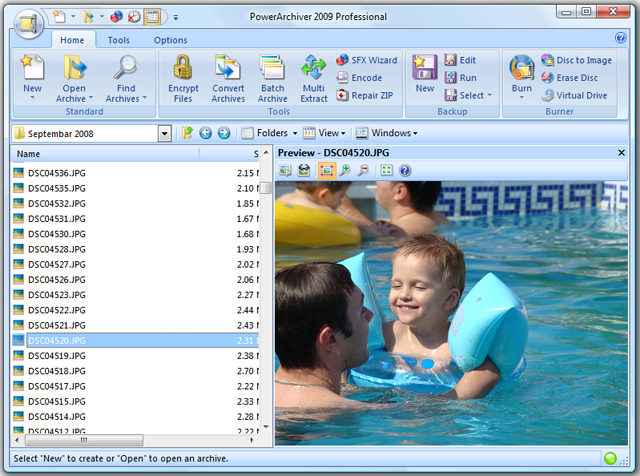
PowerArchiver 2009 11.01.03


Powerful acrhiving program is PowerArchiver that  offers hundreds of features, yet remains easy to use, small and fast. Novice users will find a familiar interface complete with tutorial and detailed help, while more experienced users can take advantage of full Explorer integration, multiple encryption methods and advanced compression algorithms.

PowerArchiver is an award-winning archive utility for the Windows® family that provides support for most compressed and encoded files, as well as access to many powerful features and tools through an easy to use interface that seamlessly integrates with Windows Explorer. PowerArchiver creates and works with unlimited size ZIP archives with enhanced ZIP format speed and compression;

Password Manager stores your frequently used passwords; encrypts your archives using 5 different methods including 256-bit AES; back up your work with PowerArchiver's Auto-Backup tool and FTP support; creates powerful CAB and ZIP self extracting (SFX) archives using a Wizard; a Batch ZIP tool compresses hundreds of files all at once; and a Multi-Extract tool can extract hundreds of archives instantly. 


Feature List of PowerArchiver 2009 11.01.03:
  • Complete built-in support for 7-ZIP, ZIP, CAB, LHA (LZH), TAR, TAR.GZ, TAR.BZ2, BH, RAR, ARJ, ARC, ACE, ZOO, GZ, and BZIP2 file formats 
  • Support for reading and extracting disc image formats: ISO, BIN, IMG and NRG 
  • Built-in support for XXE, UUE, and yENC encoded files and full MIME (Base 64) support 
  • Creating ZIP and CAB and PAE encrypted self-extracting archives using a Wizard interface 
  • Support for unlimited size ZIP archives, with improved performance when working with 100,000+ files 
  • Support for Deflate64, providing improved compression results (both size and speed) 
  • Complete support for PKZIP 4.0 and PKZIP 4.5 disk spanning 
  • Compression Profiles to store frequently used compression settings 
  • Full support for ZIP AES encryption, 128-bit/192-bit/256-bit (supports: PKZip 5.1 (full), Secure Zip 8.0 and WinZip 9.0 AE-1 & AE-2) and proprietary PAE format using 5 different methods: Blowfish (128-bit), DES (64-bit), Triple DES (128-bit), AES 128-bit, and AES 256-bit 
  • Support for AES encrypted 7-Zip archives and multivolume 7-Zip archives 
  • Uploading archives or backups directly to FTP or SFTP (SSH) sites with multiple profiles supported and timeout option 
  • Password manager for saving frequently used passwords 
  • Tool for creating PBS backup scripts and running automated backups 
  • Internal viewer that supports TXT, RTF, GIF, PNG, BMP, ICO, TIFF, GFI, SGI, EMF, WMF, PPM, Adobe Photoshop, Autodesk, Truevision, - ZSoft Paintbrush, Kodak Photo-CD, JASC PaintShop Pro, and Dr. Halo file formats 
  • Many powerful archive operations (including: renaming files in archive, spanning archives, testing archives, viewing and writing comments, installing archives, and checking archives for viruses) 
  • Drag and Drop from/to Windows Explorer and the Desktop 
  • Two ways of viewing archives (Classic - all files in the same listing; Explorer - browsing through an archive like folders in Windows Explorer) 
  • Complete integration with Windows (extracting archives and creating archives directly from Windows Explorer using powerful "Explorer Shell Extensions") 
  • Ability to edit files within an archive using one single operation 
  • Printing file listing to text file or HTML document 
  • Tool for repairing corrupted ZIP archives 
  • Converting between file formats (for example: changing a ZIP archive to CAB archive, or LHA archive to ZIP archive) 
  • Extracting multiple archives at the same time 
  • Batch Zip function to create multiple different archives at once 
  • Favorite Folders to quickly locate archives 
  • Powerful Find function for searching within an archive 
  • Auto Update to automatically download and install new versions of PowerArchiver 
  • Powerful help in HTML and a tutorial with pictures for beginners 
  • Full skinning support via PSF files - includes interface skins, toolbar skins, icons and customizable application settings 
  • Customizable toolbar that can be docked to any side of the application or float independently 
  • Windows XP Theme and ClearType support

Download PowerArchiver 2009 11.01

Download PowerArchiver 2007 10.22 

Download PowerArchiver in your Language

Homepage - http://www.powerarchiver.com 
Size: 6.90 MB